Transcribe an interview on the phone that recorded it
An interview is not a voice memo with more words in it. Two people talk, one of them is a source or a client or a candidate, the recording runs an hour, and the transcript has to leave the app and go somewhere – a draft, a case file, a report. Kaseta records the conversation and turns it into text on the iPhone itself, in 99 languages, without an account and without sending the audio anywhere.
That last part is why most journalists, researchers, lawyers and recruiters end up on a page like this. The rest of it is why they stay.
What you get back
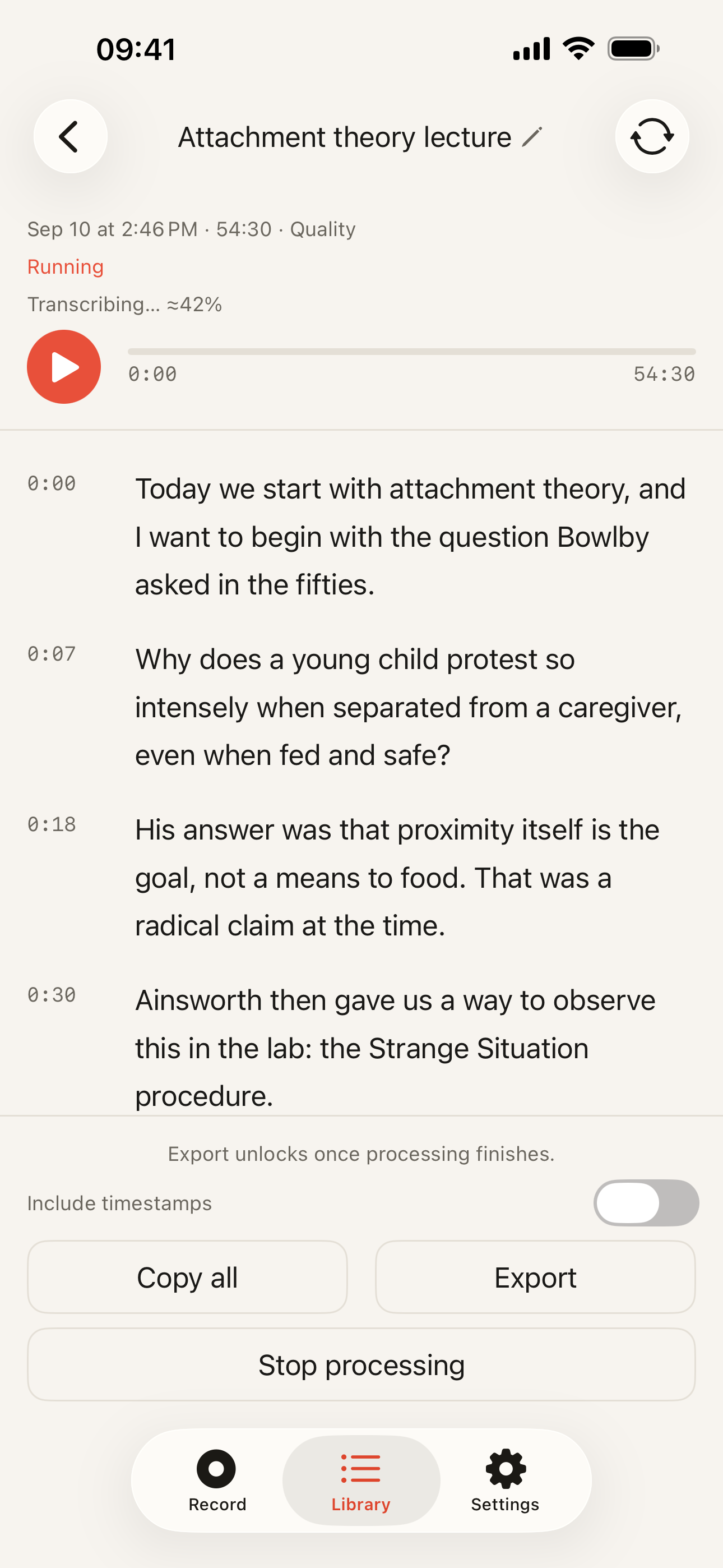
One transcript, timecoded throughout, produced on the phone after you tap Stop. Ask for speaker labels on the finished transcript and an interview reads as a conversation rather than as an undifferentiated wall of text; labelling covers up to 60 minutes of a recording. That is what makes it usable at the point you actually need it, which is three weeks later when you remember a good answer and not which minute of the recording it was in.
The timecodes are the working part: they are how you find the thirty seconds you want to quote inside an hour of speech, and how you cite a passage somebody else can check against the audio.
Interviews run long
The free plan transcribes the first 5 minutes of each recording. Pro transcribes the whole recording, however long the interview ran.
The distinction that matters here is between recording and transcription. The recording is never cut off. Audio keeps going past the text ceiling and is saved in full, so a ninety-minute interview captured on the free plan is a complete ninety-minute recording – the first five minutes of it are text, and the rest is sitting there whenever you decide to unlock it. You never discover afterwards that the app stopped listening at minute six.
Pro costs $19.99 a year or $39.99 once, and nothing is metered: nobody counts the minutes you record, because the computation happens on a phone you already own rather than on hardware we have to rent.
Getting the transcript out
Copying and export both work on every plan: Plain Text, Markdown, SRT, WebVTT or JSON, with or without timestamps. A file is what matters for interview work – it drops into a document, a case bundle or an editing timeline. A transcript you can only read inside an app is half a transcript.
The material is usually confidential
This is where on-device transcription stops being a preference and starts being the argument.
An interview subject is a source, a patient, a client or a candidate, and what they said belongs to them at least as much as it does to you. Cloud services are not careless about that – they encrypt in transit, publish retention policies, and the serious ones will sign a processing agreement. But each of those is a promise about what a third party does with a copy of your recording after it arrives. On-device transcription removes the copy: no request to secure, no vendor to audit, no retention window, and no breach that could involve your interview, because it never entered anyone’s system.
You do not have to take this on trust. Put the phone in airplane mode, record, tap Stop, and read the transcript. If the work were happening in a data centre, that is the step that would fail.
One honest exception, because it is the part we do not control: if iPhone backup is switched on, your recordings are included in your own iCloud backup along with everything else on the phone. That copy goes to your Apple account, never to us. It is a setting on the phone rather than something this app does – but it does mean the audio can exist somewhere other than the handset, so check it in the iPhone’s iCloud settings before you record something you have promised to protect.
Recording someone else has rules
Consent law varies by country, and within some countries by state: in some places one party to the conversation may consent, in others everyone in the room must. Workplaces, courts and schools frequently add requirements of their own on top. A journalist already knows this; a recruiter recording a candidate sometimes has not thought about it.
The app changes none of it, and we cannot advise you on it. Ask before you press record, and if the answer matters legally, ask someone qualified rather than a landing page.
When something else is the better tool
Every one of these is about the same boundary: Kaseta is a phone in the room where the conversation is happening. Move the conversation somewhere else and it stops being the right tool.
- A remote call. Otter and Notta run a bot that joins a Zoom or Teams meeting. Kaseta records what the phone’s microphone hears – nothing running in your pocket can attend a call on your behalf.
- The audio on a remote call, even if you are on it. A phone listening to a laptop speaker across a desk is working from a worse recording than a bot taking the meeting feed at source. For an interview in a room, the phone is in exactly the right place; for one over a screen, it is not.
- A shared workspace. Colleagues opening the same transcript, commenting on it, searching across everything a team has captured. Kaseta’s transcripts sit on one phone, and sharing means exporting a file and sending it.
- Access from a browser. Otter and Notta open on whatever device you are holding. Kaseta is an iPhone app, full stop – if your working day happens on a laptop, that is a real cost.
- Anything that has to be verbatim and certified. A deposition, an official record. No automatic transcript of any kind – ours included – is the right answer there.
The first four are one trade seen from four angles, and the Otter comparison lays it out in full: a cloud service is built around calls and teams, and is better at both than anything running on one phone.
If your interviews happen in rooms, the fit is narrow and specific: a conversation you recorded yourself, which should not be handed to anyone else, transcribed on the device that heard it. The technical detail is in how offline transcription works, the workplace-policy version of the same argument is for no-cloud workplaces, and the mechanics of getting an existing recording into the app are in the transcription guide.